Exciting New Sorting and Filtering in Template Library!
We're thrilled to introduce new sorting and filtering options to make your template library experience even better!
💥 Problem Statement:
Finding recent templates was a hassle.
Too much scrolling to find the right template
Had trouble spotting new templates
No way to spot the most popular/ used templates for benchmarking
No easy way to track hidden templates to make edits or unhide
✅ What we did?
Filters:
Default Templates : Easily find templates added
Hidden Templates: Quickly access templates you've hidden.
Sorting:
Most Recent: Find the latest templates at a glance.
Most Popular: Discover the most-used templates effortlessly.
⭐ Benefits:
Easier and faster template management
Save time finding the perfect template.
👷 How to use it?

The Sorting options are present in a drop down menu for every product on right hand top

The Left hand panel has the options to filter view only the Default or Hidden Templates
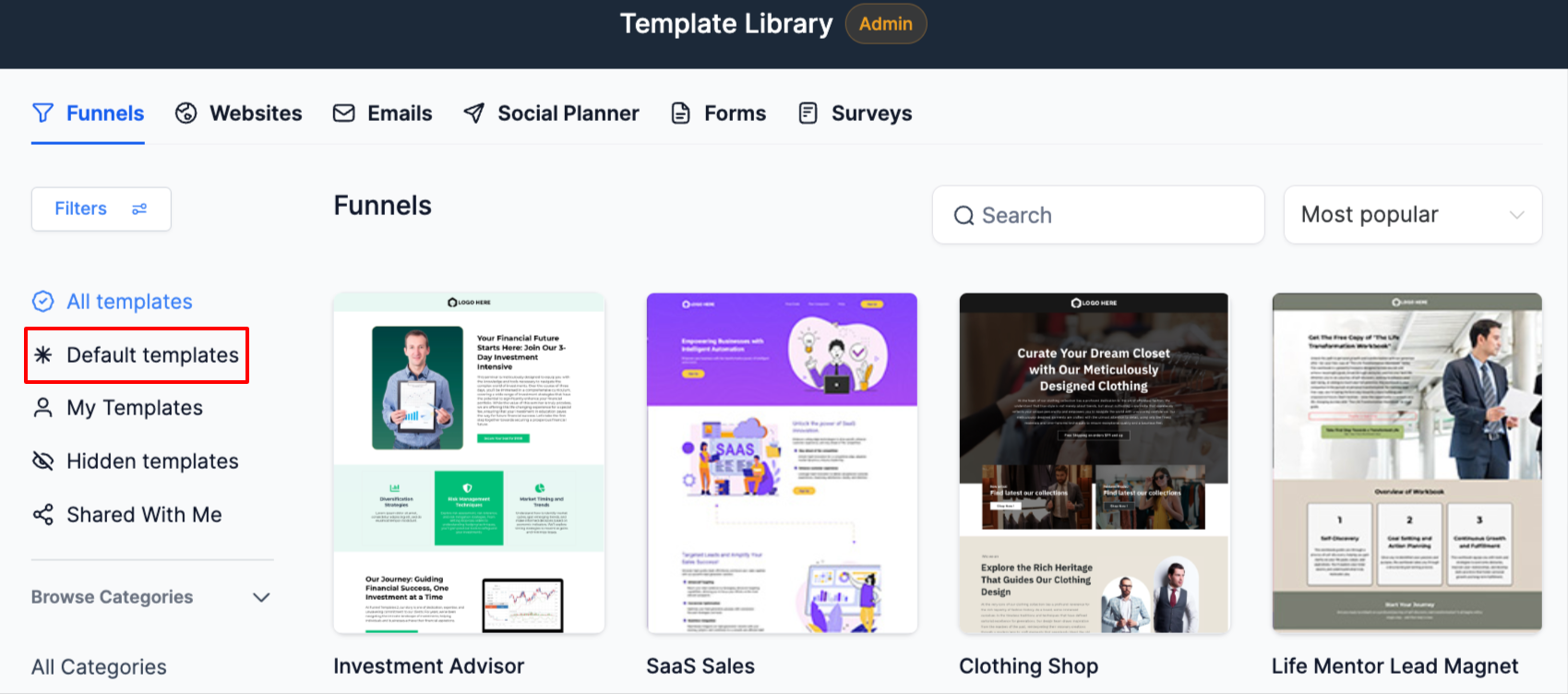
With this the user can also unhide the template by clicking on Show

Click on new to to start with template library
Then in the window, click on the sorting drop down to choose between most recent or most popular

Enjoy a smoother and more efficient template library experience!